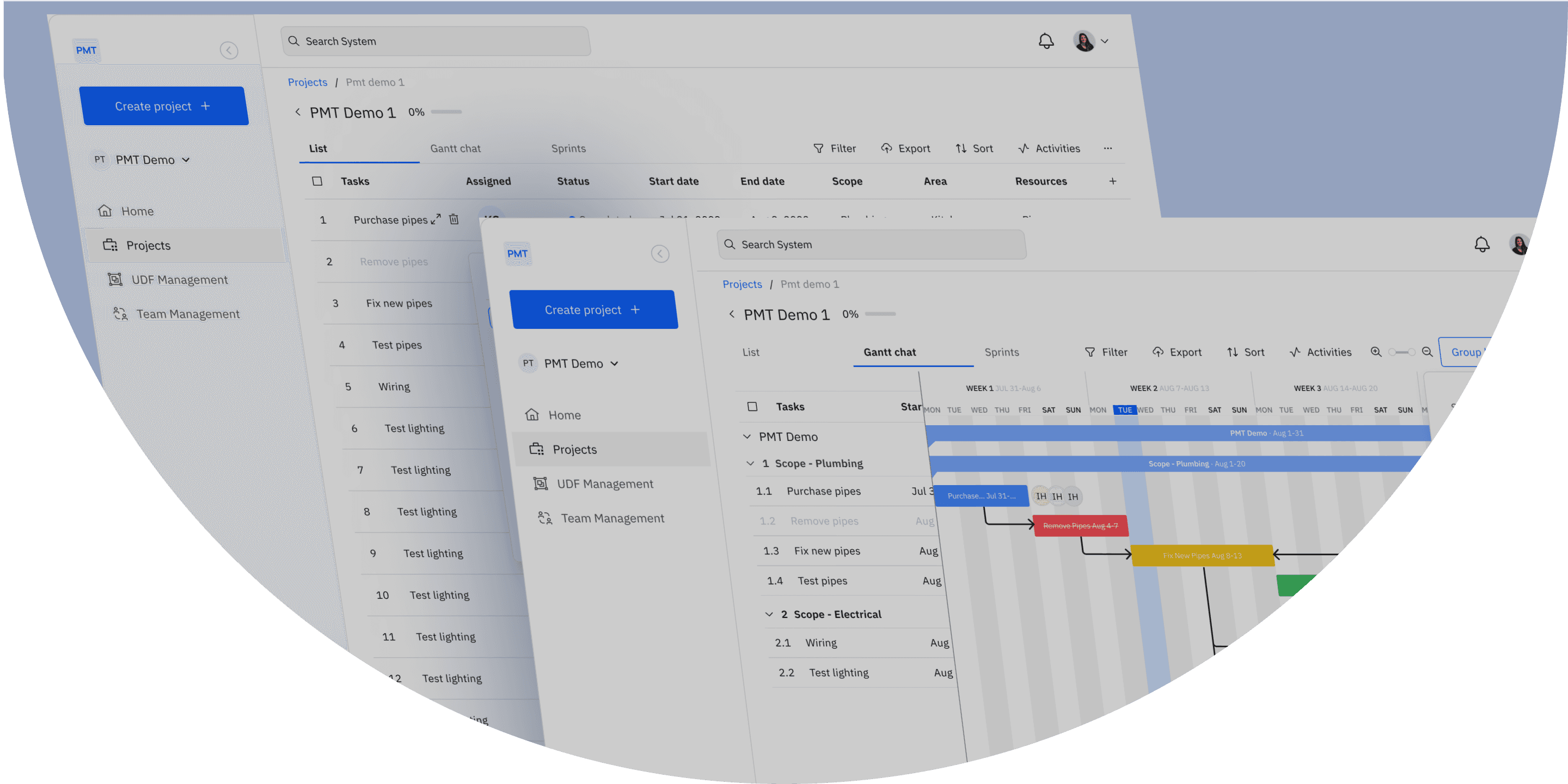
Redesigning Construction Project Management for Commercial Real Estate
Redesigning Construction Project Management for Commercial Real Estate
UI/UX Designer (Solo Designer, Contract)
UI/UX Designer (Solo Designer, Contract)
Jun - Oct 2023
Jun - Oct 2023
Web App + Mobile Responsive
Web App + Mobile Responsive
Startup Client, Development Team
Startup Client, Development Team
Launched MVP
Launched MVP
80%
80%
Improvement in mobile usability scores
Improvement in mobile usability scores
65%
65%
Reduction in time to complete core tasks
Reduction in time to complete core tasks
3x
3x
Increase in Gantt chart filtering usage
Increase in Gantt chart filtering usage
PMT had a demo application showcasing promising features for commercial real estate construction teams, but it wasn't production-ready. As the sole designer on a 5-month contract, I transformed the confusing demo into a streamlined MVP that construction professionals could use in the field without training, improving mobile usability by 80% and reducing task completion time by 65%.
Note: Some details omitted per NDA agreement
PMT had a demo application showcasing promising features for commercial real estate construction teams, but it wasn't production-ready. As the sole designer on a 5-month contract, I transformed the confusing demo into a streamlined MVP that construction professionals could use in the field without training, improving mobile usability by 80% and reducing task completion time by 65%.
Note: Some details omitted per NDA agreement
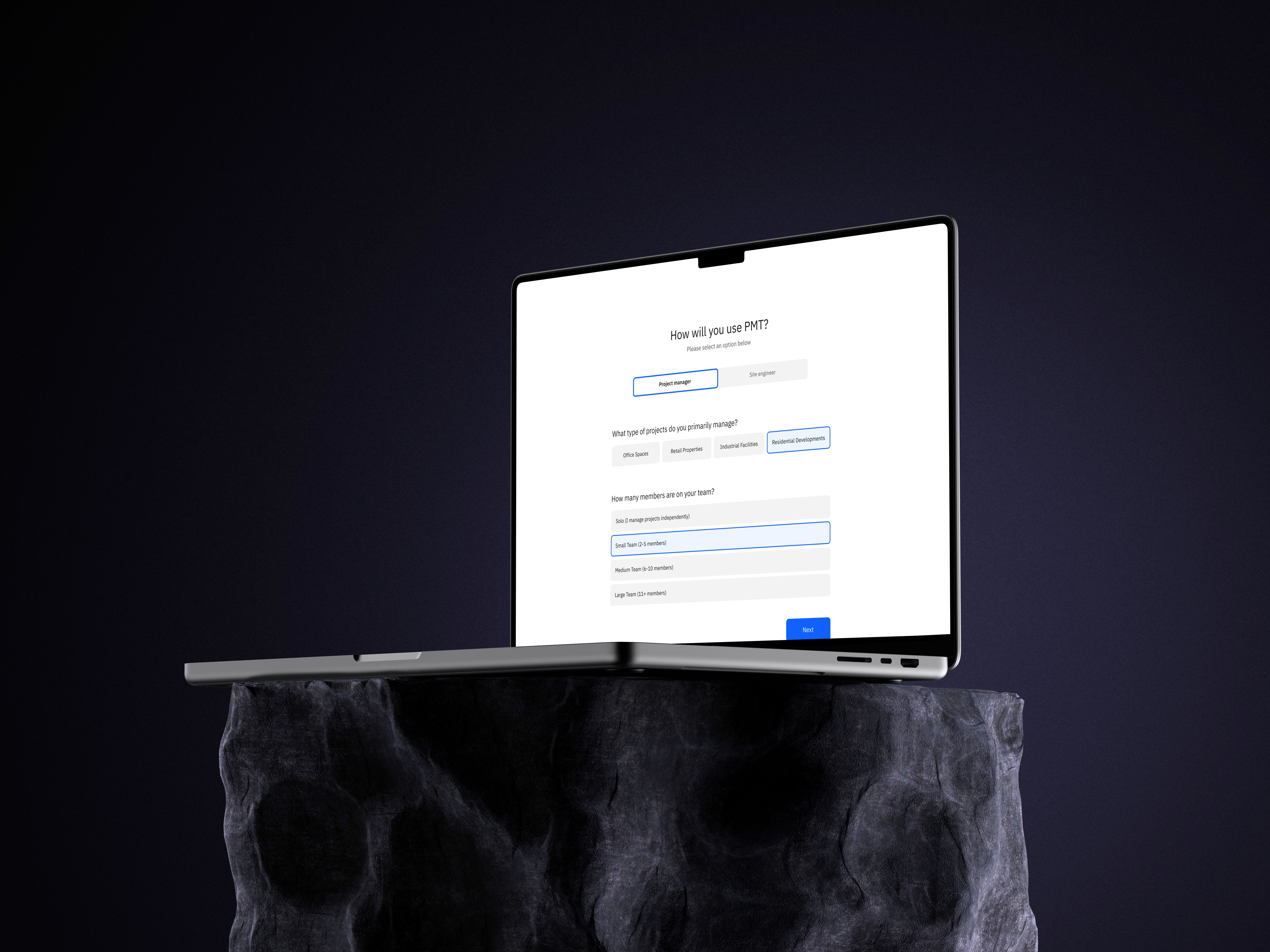
The Challenge
The Challenge
The Business Problem
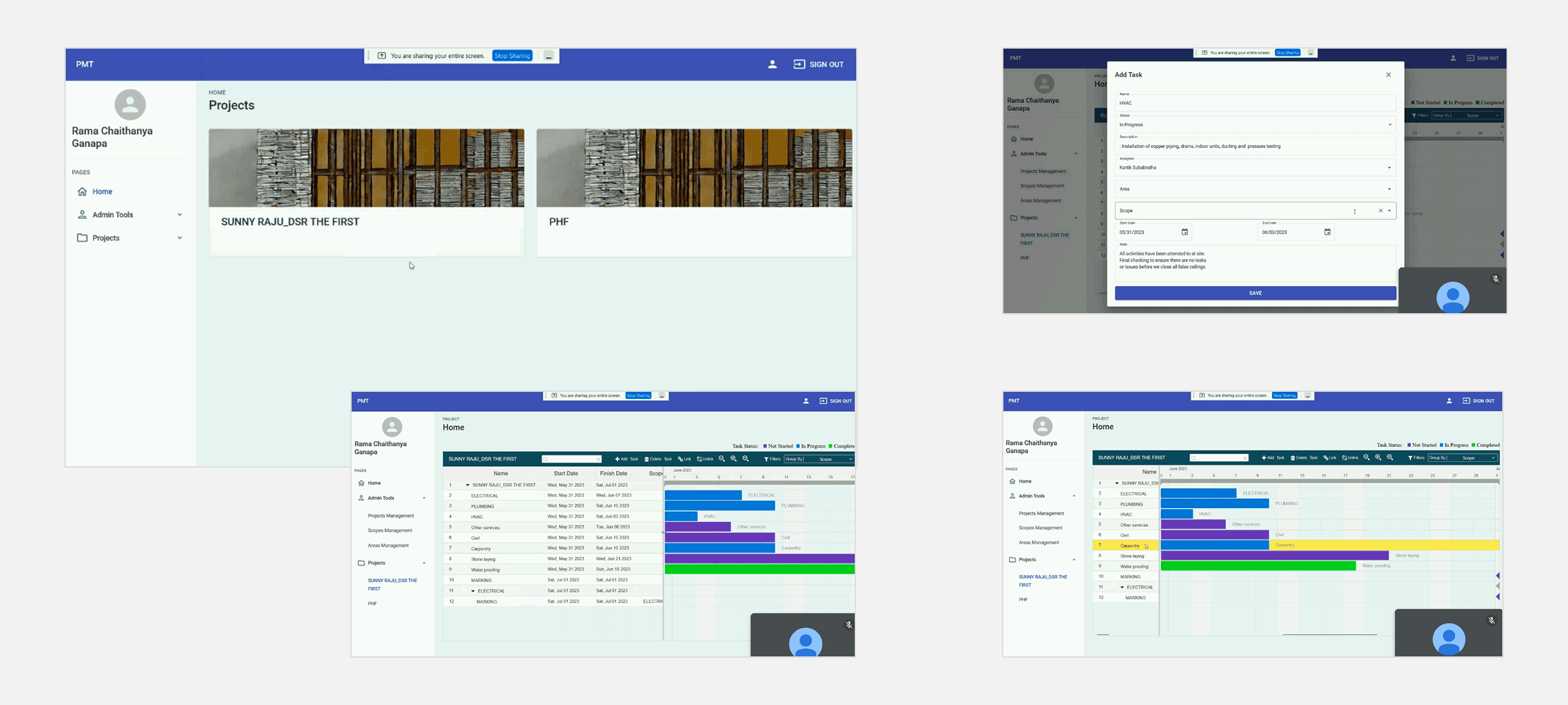
PMT had a demo application showcasing promising features for commercial real estate construction teams, but it wasn't production-ready. The startup needed to translate concepts into a functional MVP that could attract early adopters and prove market fit. Generic project management tools (Asana, Monday) weren't designed for construction workflows, leaving a gap for specialized solutions.
User Problems (From Demo Testing)
Navigation chaos: Users got lost in the app hierarchy
Mobile disaster: Site managers couldn't use the tool on construction sites
Complexity overload: Needed constant guidance to complete basic tasks
Poor data visualization: Couldn't quickly understand project status or timelines
Terminology confusion: Industry-specific terms weren't clearly defined
Core User Needs
Visual project timelines (Gantt charts) with custom filtering
Mobile-first experience for field work
Industry-specific customization (User-Defined Fields)
Simple navigation (construction teams aren't tech-savvy)
Project batching and dependency tracking
My Goal
Transform the confusing demo into a streamlined MVP that construction professionals could use in the field without training.
The Business Problem
PMT had a demo application showcasing promising features for commercial real estate construction teams, but it wasn't production-ready. The startup needed to translate concepts into a functional MVP that could attract early adopters and prove market fit. Generic project management tools (Asana, Monday) weren't designed for construction workflows, leaving a gap for specialized solutions.
User Problems (From Demo Testing)
Navigation chaos: Users got lost in the app hierarchy
Mobile disaster: Site managers couldn't use the tool on construction sites
Complexity overload: Needed constant guidance to complete basic tasks
Poor data visualization: Couldn't quickly understand project status or timelines
Terminology confusion: Industry-specific terms weren't clearly defined
Core User Needs
Visual project timelines (Gantt charts) with custom filtering
Mobile-first experience for field work
Industry-specific customization (User-Defined Fields)
Simple navigation (construction teams aren't tech-savvy)
Project batching and dependency tracking
My Goal
Transform the confusing demo into a streamlined MVP that construction professionals could use in the field without training.
My Approach
My Approach
Working as Solo Designer
As the sole designer on a 5-month contract, I owned the entire design cycle from discovery to developer handoff. I collaborated closely with the client and development team to balance ambitious feature requests with MVP realities.
My Process
1. Design Audit of Demo App (Week 1-2)
Systematically analyzed the demo to understand the team's vision and identify UX failures.
Key Findings:
No clear navigation system (3+ levels deep with no breadcrumbs)
Outdated, inconsistent visual design
No error states or user guidance
Desktop-only design (unusable on mobile)
Generic terminology (didn't match construction industry language)
2. Reviewed Demo Test Feedback (Week 2)
Analyzed user feedback from construction professionals:
"Too complex, need someone to hold my hand"
"Can't use this on a job site—it's not mobile-friendly"
3. Competitive Analysis (Week 2-3)
Studied generic tools (Asana, Monday, Trello) and construction-specific tools (Procore, PlanGrid) to identify baseline patterns and opportunities for improvement.
4. User Personas & Scenarios (Week 3)
Defined two primary personas:
Project Managers: Office-based, need oversight of multiple projects
Site Managers/Subcontractors: Field-based, need mobile access to update tasks
5. Information Architecture Redesign (Week 3-4)
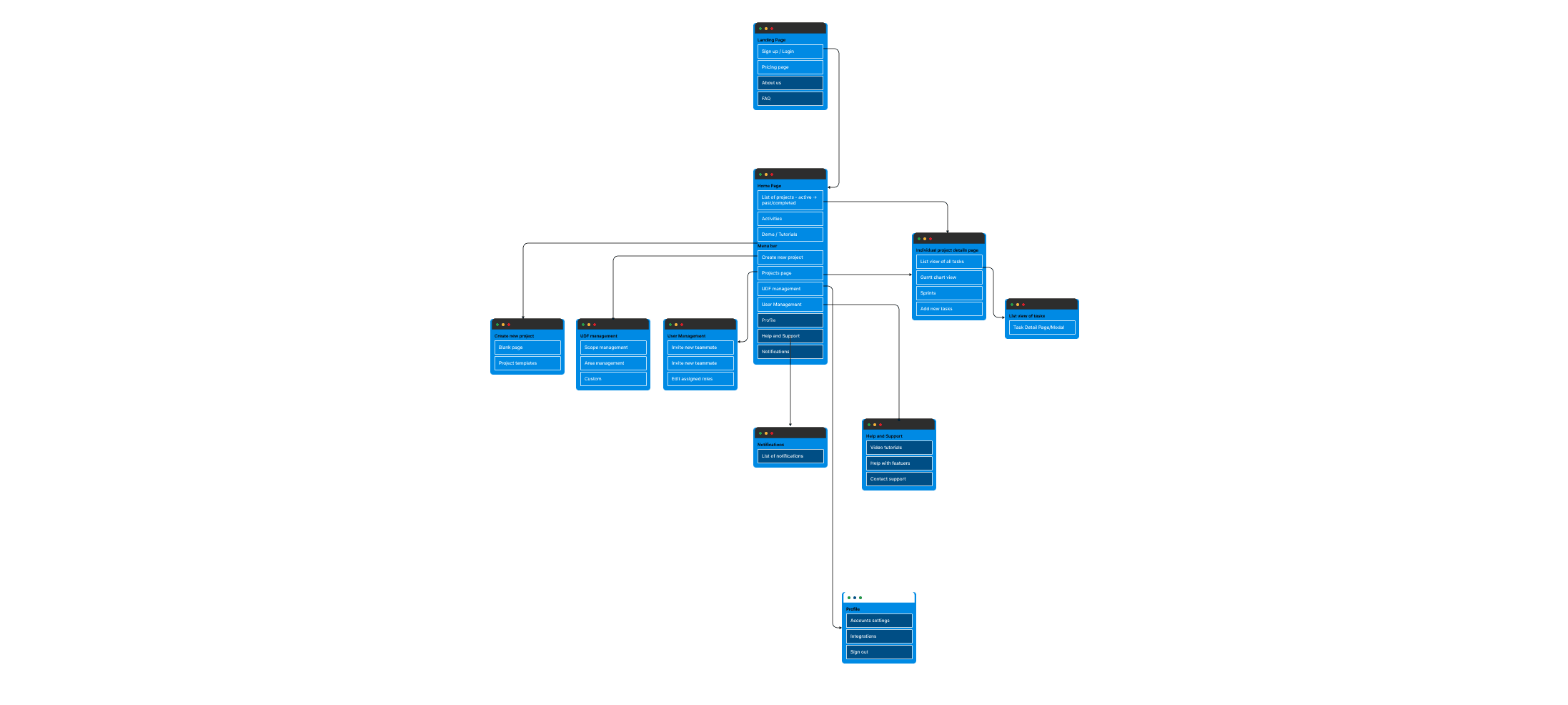
Rebuilt navigation from scratch with maximum 3-level hierarchy, clear breadcrumbs, and logical feature grouping.
6. Wireframing & Iteration (Week 4-6)
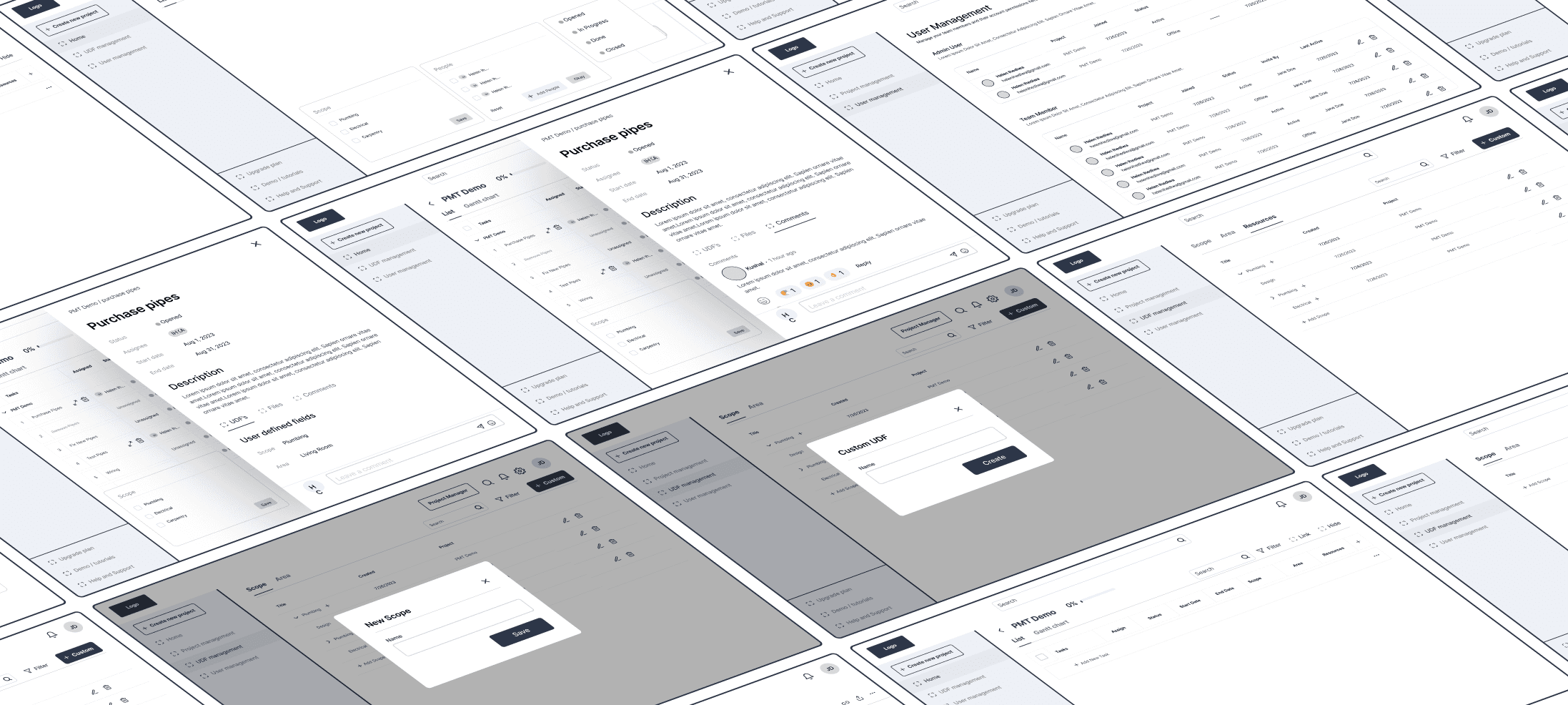
Three rounds of iteration focusing on simplified layouts, mobile-first responsive patterns, and clear visual hierarchy.
7. High-Fidelity Design & Prototyping (Week 6-14)
Built complete design system with component library and interactive prototypes for developer handoff.
8. Usability Testing (Week 15-16)
Tested with 3 target users across 60-minute sessions to identify final refinements before launch.
Working as Solo Designer
As the sole designer on a 5-month contract, I owned the entire design cycle from discovery to developer handoff. I collaborated closely with the client and development team to balance ambitious feature requests with MVP realities.
My Process
1. Design Audit of Demo App (Week 1-2)
Systematically analyzed the demo to understand the team's vision and identify UX failures.
Key Findings:
No clear navigation system (3+ levels deep with no breadcrumbs)
Outdated, inconsistent visual design
No error states or user guidance
Desktop-only design (unusable on mobile)
Generic terminology (didn't match construction industry language)
2. Reviewed Demo Test Feedback (Week 2)
Analyzed user feedback from construction professionals:
"Too complex, need someone to hold my hand"
"Can't use this on a job site—it's not mobile-friendly"
3. Competitive Analysis (Week 2-3)
Studied generic tools (Asana, Monday, Trello) and construction-specific tools (Procore, PlanGrid) to identify baseline patterns and opportunities for improvement.
4. User Personas & Scenarios (Week 3)
Defined two primary personas:
Project Managers: Office-based, need oversight of multiple projects
Site Managers/Subcontractors: Field-based, need mobile access to update tasks
5. Information Architecture Redesign (Week 3-4)
Rebuilt navigation from scratch with maximum 3-level hierarchy, clear breadcrumbs, and logical feature grouping.
6. Wireframing & Iteration (Week 4-6)
Three rounds of iteration focusing on simplified layouts, mobile-first responsive patterns, and clear visual hierarchy.
7. High-Fidelity Design & Prototyping (Week 6-14)
Built complete design system with component library and interactive prototypes for developer handoff.
8. Usability Testing (Week 15-16)
Tested with 3 target users across 60-minute sessions to identify final refinements before launch.
Mobile-First Responsive Design
Mobile-First Responsive Design
The Problem
The demo was desktop-only. Site managers work on construction sites using phones and tablets, often with gloves, in bright sunlight, with poor connectivity. The tool was unusable in their actual work environment.
My Solution
Redesigned the entire application mobile-first:
Mobile Optimizations
Large touch targets (minimum 44px) for gloved hands
High contrast for outdoor visibility
Simplified task cards with essential info only
Bottom navigation for thumb-friendly access
Offline-capable core features (view tasks, update status)
Swipe gestures for common actions (mark complete, add comment)
Responsive Patterns
Single-column layout on mobile → multi-column on desktop
Collapsible sections to maximize screen space
Priority-based information display (most important data shown first)
Impact
80% improvement in mobile usability scores (measured via System Usability Scale). Site managers could finally update project status from the field without returning to office.
The Problem
The demo was desktop-only. Site managers work on construction sites using phones and tablets, often with gloves, in bright sunlight, with poor connectivity. The tool was unusable in their actual work environment.
My Solution
Redesigned the entire application mobile-first:
Mobile Optimizations
Large touch targets (minimum 44px) for gloved hands
High contrast for outdoor visibility
Simplified task cards with essential info only
Bottom navigation for thumb-friendly access
Offline-capable core features (view tasks, update status)
Swipe gestures for common actions (mark complete, add comment)
Responsive Patterns
Single-column layout on mobile → multi-column on desktop
Collapsible sections to maximize screen space
Priority-based information display (most important data shown first)
Impact
80% improvement in mobile usability scores (measured via System Usability Scale). Site managers could finally update project status from the field without returning to office.
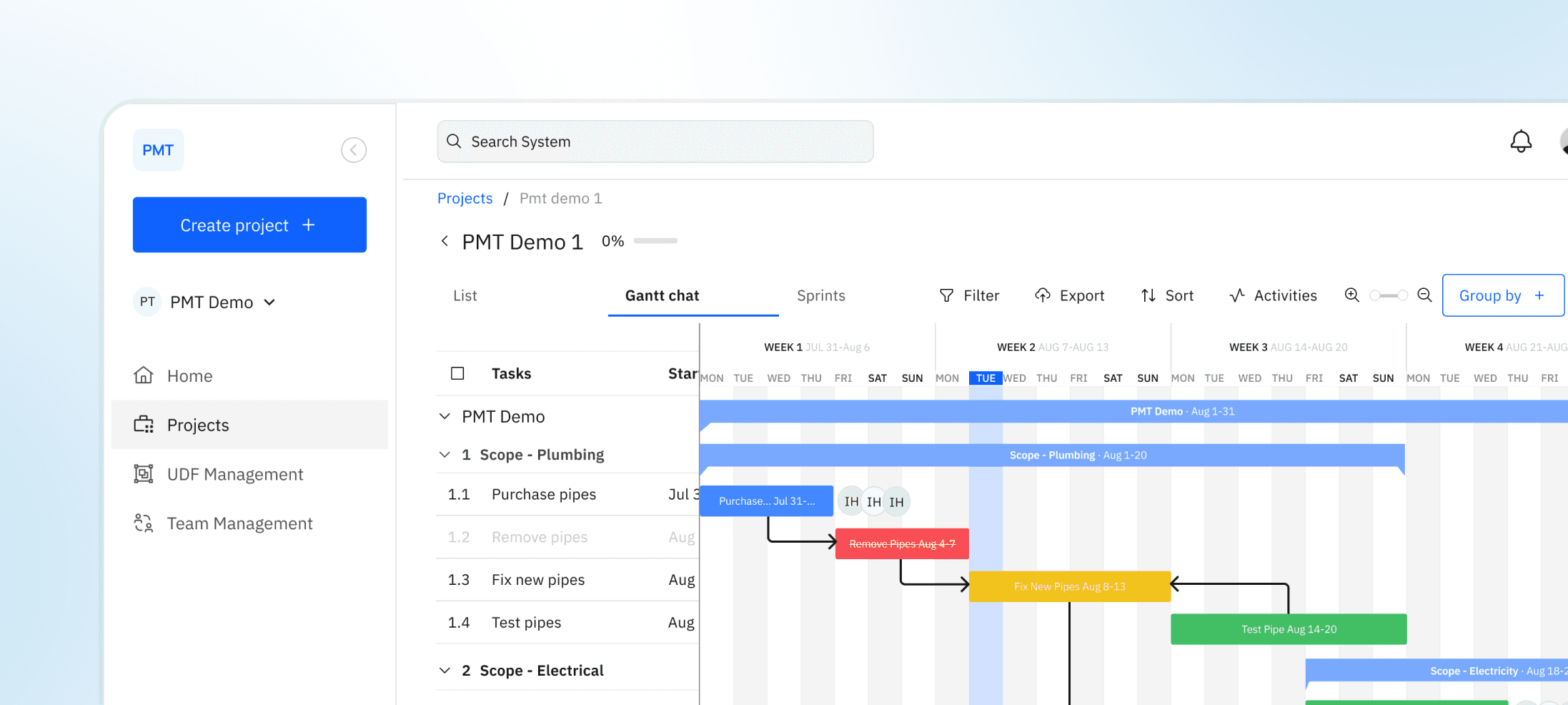
Clear 3-Level Navigation System
Clear 3-Level Navigation System
The Problem
Demo app had confusing navigation. Users got lost, couldn't find features, and didn't understand how information was organized. No breadcrumbs, inconsistent menu structure, dead-ends.
My Solution
Redesigned navigation with strict 3-level hierarchy:
Structure
Level 1: Main sections (Projects, Team, Analytics, Settings)
Level 2: Feature categories (e.g., Projects → Active | Archived | Templates)
Level 3: Specific items (e.g., Active → Project X)
Navigation Features
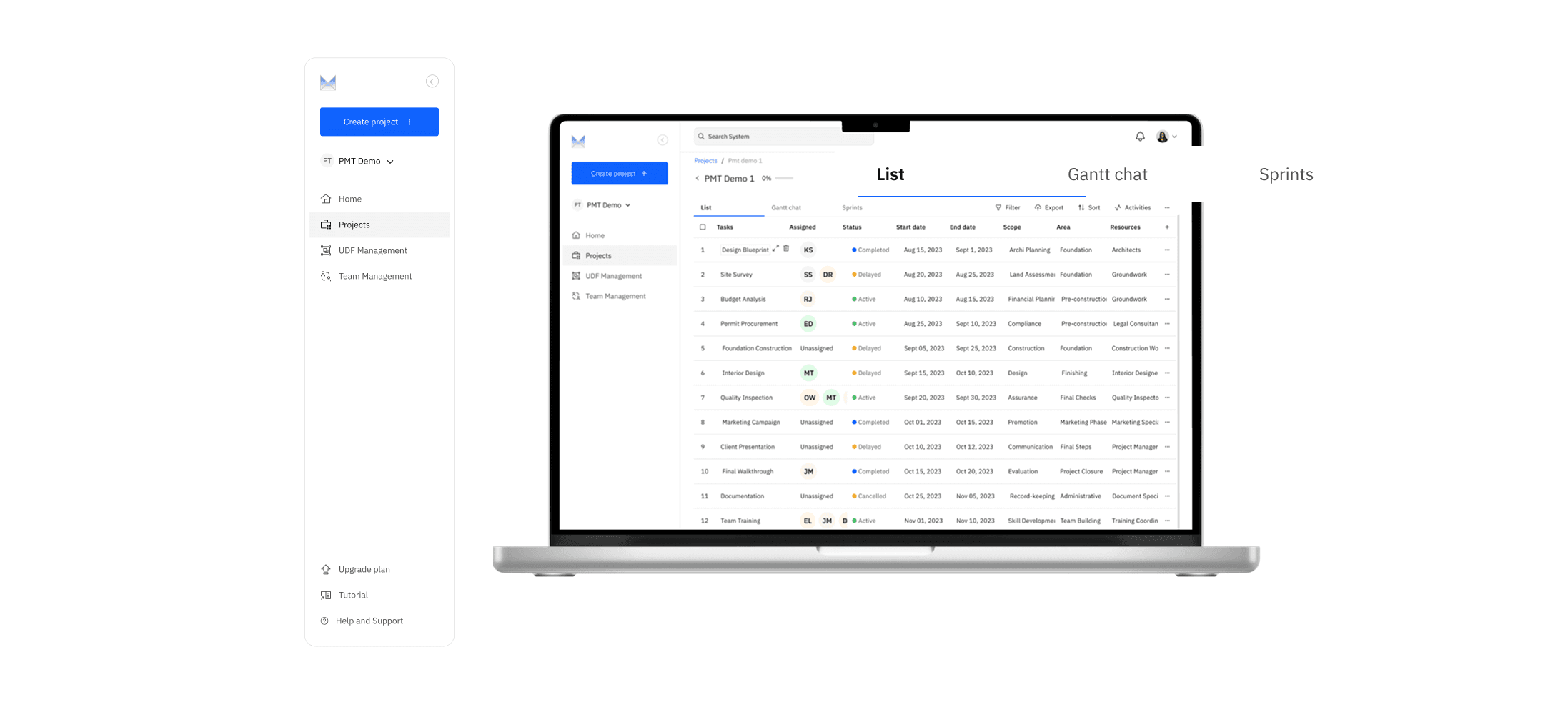
Persistent left sidebar (desktop) / bottom nav (mobile)
Breadcrumb trail showing current location
Grouped related features under clear labels
Search bar accessible from anywhere
Recent/favorites for quick access to frequent tasks
Visual Hierarchy
Clear section dividers
Active state indicators
Consistent iconography
Logical grouping (all project-related actions under "Projects")
Impact
Users stopped getting lost. Testing showed users could complete navigation tasks without assistance, unlike the demo where they needed constant guidance.
The Problem
Demo app had confusing navigation. Users got lost, couldn't find features, and didn't understand how information was organized. No breadcrumbs, inconsistent menu structure, dead-ends.
My Solution
Redesigned navigation with strict 3-level hierarchy:
Structure
Level 1: Main sections (Projects, Team, Analytics, Settings)
Level 2: Feature categories (e.g., Projects → Active | Archived | Templates)
Level 3: Specific items (e.g., Active → Project X)
Navigation Features
Persistent left sidebar (desktop) / bottom nav (mobile)
Breadcrumb trail showing current location
Grouped related features under clear labels
Search bar accessible from anywhere
Recent/favorites for quick access to frequent tasks
Visual Hierarchy
Clear section dividers
Active state indicators
Consistent iconography
Logical grouping (all project-related actions under "Projects")
Impact
Users stopped getting lost. Testing showed users could complete navigation tasks without assistance, unlike the demo where they needed constant guidance.
Smart Gantt Charts with Custom Filtering
Smart Gantt Charts with Custom Filtering
The Problem
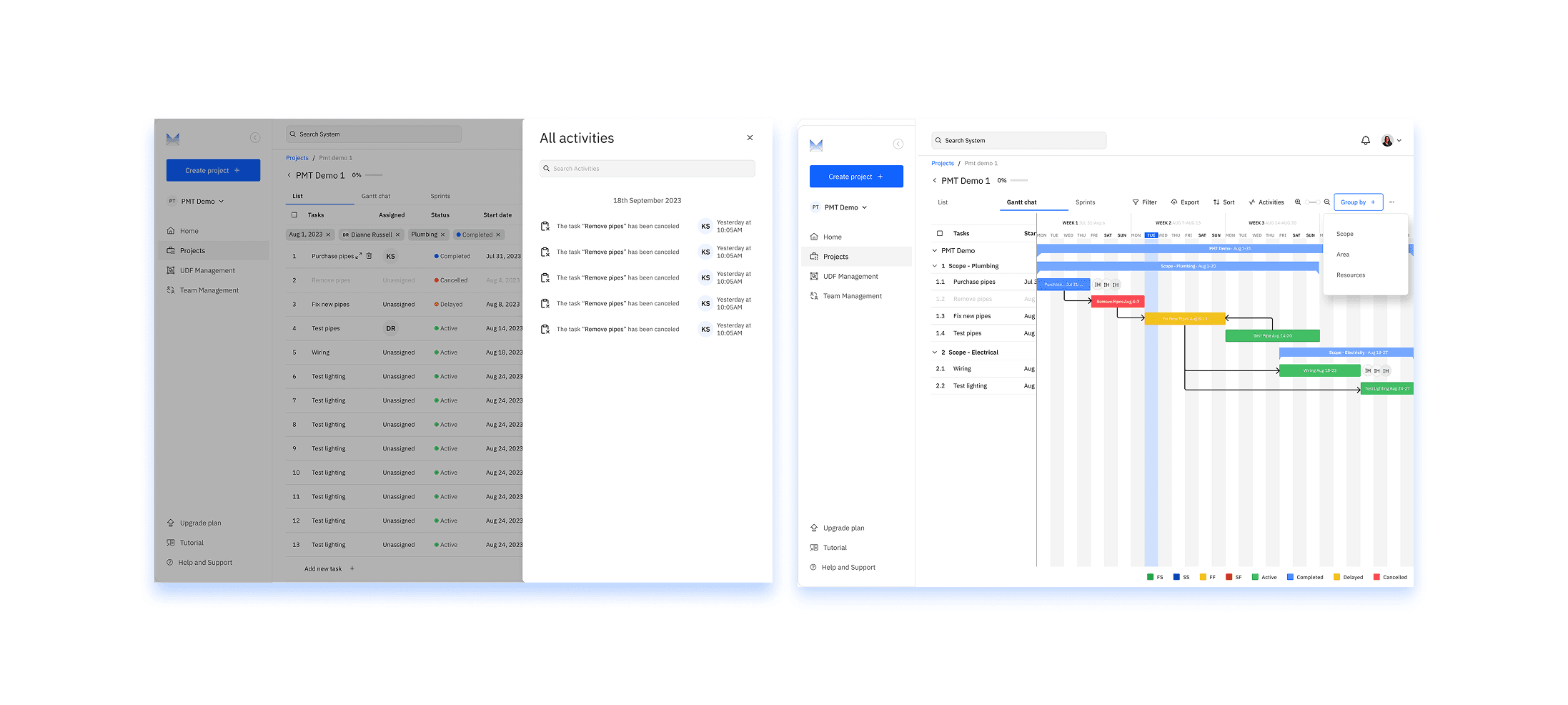
Demo Gantt chart was overwhelming—hundreds of tasks with no way to filter or focus. Users couldn't find what they needed or understand project status at a glance. Construction projects have complex dependencies that weren't visualized.
My Solution
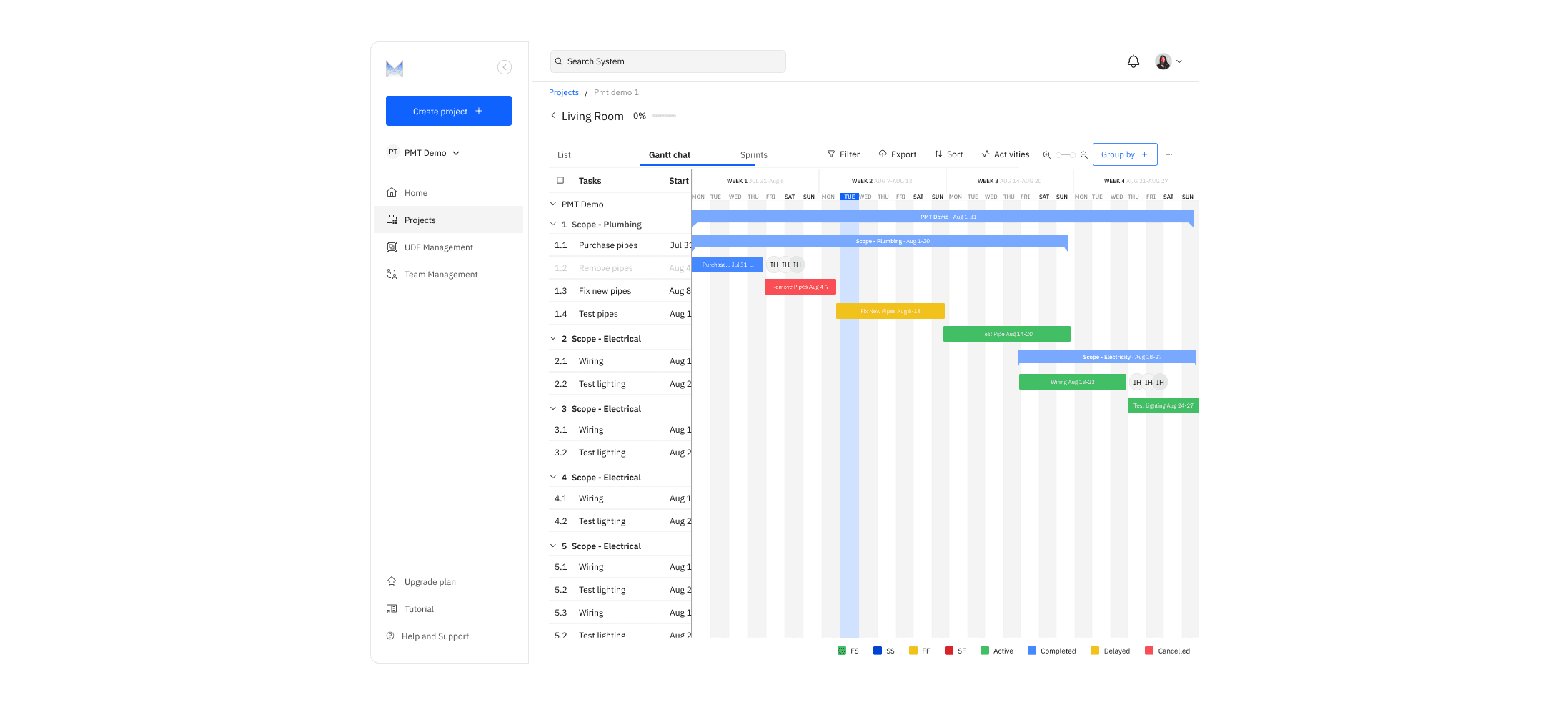
Built intelligent Gantt chart with powerful filtering:
Filtering System
Filter by: Team, project phase, deadline, task status, custom fields (UDFs)
Save filter presets (e.g., "My Tasks This Week," "Critical Path Items")
Quick filters: "Today," "This Week," "Overdue," "Unassigned"
Visual indicators: Color-coded by status, icons for blockers/dependencies
Gantt Enhancements
Dependency lines showing task relationships
Drag-to-reschedule with automatic dependency updates
Milestone markers for key dates
Progress bars showing % completion
Zoom levels: Day, week, month, quarter views
User-Defined Fields (UDF) Integration
Custom columns in Gantt view (e.g., "Budget," "Equipment," "Weather Status")
Filter and sort by any UDF
Industry-specific data visible alongside timeline
Impact
3x increase in Gantt chart filtering usage—users could finally make sense of complex construction timelines. Reduced time to find specific tasks by 65%.
The Problem
Demo Gantt chart was overwhelming—hundreds of tasks with no way to filter or focus. Users couldn't find what they needed or understand project status at a glance. Construction projects have complex dependencies that weren't visualized.
My Solution
Built intelligent Gantt chart with powerful filtering:
Filtering System
Filter by: Team, project phase, deadline, task status, custom fields (UDFs)
Save filter presets (e.g., "My Tasks This Week," "Critical Path Items")
Quick filters: "Today," "This Week," "Overdue," "Unassigned"
Visual indicators: Color-coded by status, icons for blockers/dependencies
Gantt Enhancements
Dependency lines showing task relationships
Drag-to-reschedule with automatic dependency updates
Milestone markers for key dates
Progress bars showing % completion
Zoom levels: Day, week, month, quarter views
User-Defined Fields (UDF) Integration
Custom columns in Gantt view (e.g., "Budget," "Equipment," "Weather Status")
Filter and sort by any UDF
Industry-specific data visible alongside timeline
Impact
3x increase in Gantt chart filtering usage—users could finally make sense of complex construction timelines. Reduced time to find specific tasks by 65%.
Results
Results
Quantifiable Outcomes
80% improvement in mobile usability (SUS score: 42 → 76)
65% reduction in time to complete core tasks
3x increase in Gantt chart filtering usage
100% task completion rate during usability testing (vs. demo's ~40%)
Successfully launched MVP to early adopter customers
Qualitative Feedback
"Finally, a tool that understands construction workflows"
"I can actually use this on-site without frustration"
"The Gantt filtering is exactly what we needed"
"This makes our team look more professional to clients"
Business Impact
MVP launched on time and on budget
Early adopter signups exceeded targets
Positioned PMT for seed funding round
Created scalable design system for future features
Quantifiable Outcomes
80% improvement in mobile usability (SUS score: 42 → 76)
65% reduction in time to complete core tasks
3x increase in Gantt chart filtering usage
100% task completion rate during usability testing (vs. demo's ~40%)
Successfully launched MVP to early adopter customers
Qualitative Feedback
"Finally, a tool that understands construction workflows"
"I can actually use this on-site without frustration"
"The Gantt filtering is exactly what we needed"
"This makes our team look more professional to clients"
Business Impact
MVP launched on time and on budget
Early adopter signups exceeded targets
Positioned PMT for seed funding round
Created scalable design system for future features
What I Learned
What I Learned
1. Mobile-first isn't optional for field work
Construction professionals work on-site, not at desks. Designing mobile-first forced me to prioritize essential features and eliminate clutter—which also improved the desktop experience.
2. Industry-specific customization is a competitive advantage
Generic tools fail because they don't understand niche workflows. The UDF system transformed PMT from "another project management tool" into "a construction management tool." Small customizations create massive value.
3. Simplicity scales; complexity breaks
The demo failed because it tried to do everything. By ruthlessly prioritizing core features (mobile access, Gantt charts, UDFs) and executing them excellently, we delivered more value with less. This taught me that constraint drives clarity.
4. Construction teams need visual guidance
These aren't Silicon Valley early adopters—they're practical people solving real problems. Empty states, tooltips, onboarding flows, and terminology glossaries weren't nice-to-haves; they were essential for adoption.
5. Testing catches what design reviews miss
Our pagination design looked great in mockups but confused users with large datasets. Watching real users struggle revealed assumptions I'd missed. Always test with actual target users, not just stakeholders.
1. Mobile-first isn't optional for field work
Construction professionals work on-site, not at desks. Designing mobile-first forced me to prioritize essential features and eliminate clutter—which also improved the desktop experience.
2. Industry-specific customization is a competitive advantage
Generic tools fail because they don't understand niche workflows. The UDF system transformed PMT from "another project management tool" into "a construction management tool." Small customizations create massive value.
3. Simplicity scales; complexity breaks
The demo failed because it tried to do everything. By ruthlessly prioritizing core features (mobile access, Gantt charts, UDFs) and executing them excellently, we delivered more value with less. This taught me that constraint drives clarity.
4. Construction teams need visual guidance
These aren't Silicon Valley early adopters—they're practical people solving real problems. Empty states, tooltips, onboarding flows, and terminology glossaries weren't nice-to-haves; they were essential for adoption.
5. Testing catches what design reviews miss
Our pagination design looked great in mockups but confused users with large datasets. Watching real users struggle revealed assumptions I'd missed. Always test with actual target users, not just stakeholders.
Product Design, UX Research, Mobile Design, B2B SaaS, Construction Tech, Design Systems, Data Visualization
Product Design, UX Research, Mobile Design, B2B SaaS, Construction Tech, Design Systems, Data Visualization
Based in Abuja Nigeria, working remote worldwide
Local time Gmt +1
PRODUCT DESIGN *
USER RESEARCH *
DESIGN SYSTEMS *
CULTURAL DESIGN *
AI WORKFLOWS *
All rights reserved
Designed and developed by Helen Ihediwa © 2025
Based in Abuja Nigeria, working remote worldwide
Local time Gmt +1
PRODUCT DESIGN *
USER RESEARCH *
DESIGN SYSTEMS *
CULTURAL DESIGN *
AI WORKFLOWS *
All rights reserved
Designed and developed by Helen Ihediwa © 2025
Based in Abuja Nigeria, working remote worldwide
Local time Gmt +1
PRODUCT DESIGN *
USER RESEARCH *
DESIGN SYSTEMS *
CULTURAL DESIGN *
AI WORKFLOWS *
All rights reserved
Designed and developed by Helen Ihediwa © 2025