Redesigning a Collective Sensemaking Platform for Knowledge Discovery
Redesigning a Collective Sensemaking Platform for Knowledge Discovery
Product Designer
Product Designer
https://hunome.com/
https://hunome.com/
Web Application
Web Application
Engineering, Product, Data
Engineering, Product, Data
Launched
Launched
Complete
Complete
UI system redesign for complex knowledge platform
UI system redesign for complex knowledge platform
100%
100%
Designs implemented and live in production
Designs implemented and live in production
Novel
Novel
Interface patterns for unfamiliar interactions
Interface patterns for unfamiliar interactions
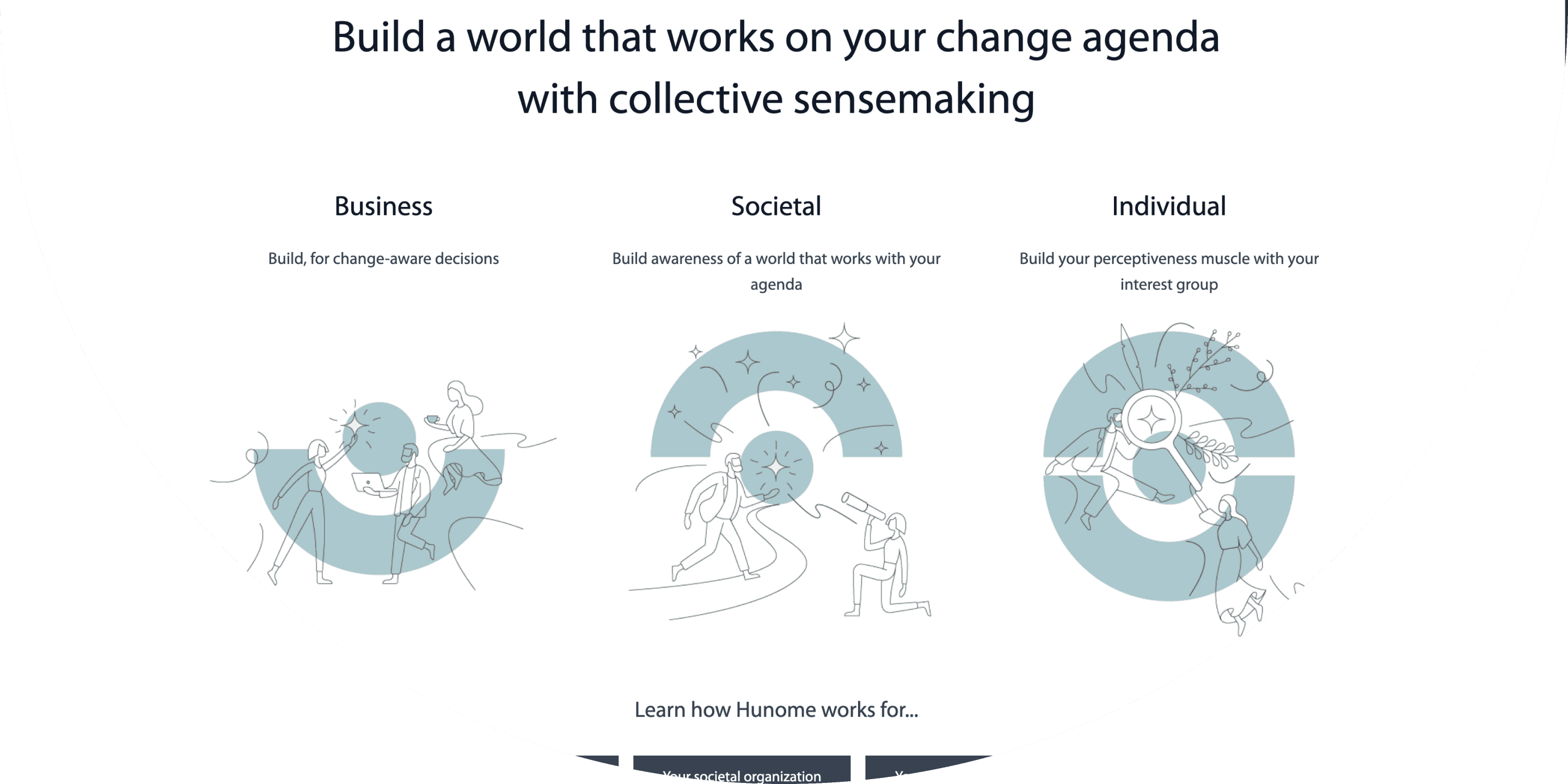
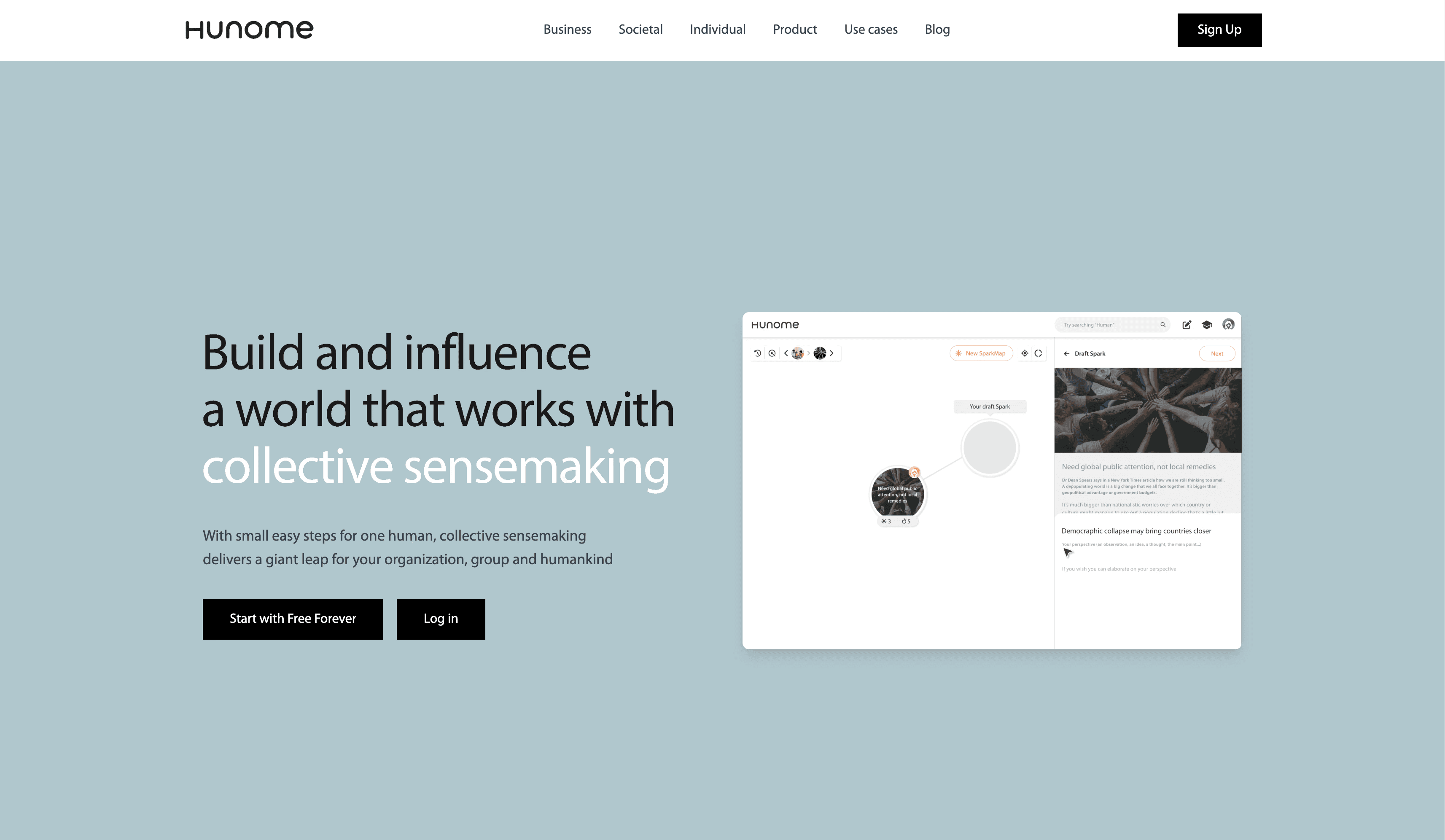
Hunome is a collective sensemaking platform where users create "Sparks" (perspectives) and connect them into "SparkMaps" (visual knowledge networks). I redesigned the UI system to make this complex, unfamiliar interaction model intuitive and clear.
Hunome is a collective sensemaking platform where users create "Sparks" (perspectives) and connect them into "SparkMaps" (visual knowledge networks). I redesigned the UI system to make this complex, unfamiliar interaction model intuitive and clear.
The Challenge
The Challenge
The Problem
Hunome's node-based knowledge mapping is unlike anything users have seen before. The existing UI made this unfamiliar interaction model even harder to understand.
Core Issues
Users didn't understand how to create or connect Sparks
Navigation between views (map, search, profile) felt confusing
Visual hierarchy didn't guide users through workflows
Data visualization needed clarity for insights to be useful
My Goal
Make an unfamiliar interface feel intuitive through clear navigation, visual hierarchy, helpful copy, tooltips, and consistent interaction patterns.
The Problem
Hunome's node-based knowledge mapping is unlike anything users have seen before. The existing UI made this unfamiliar interaction model even harder to understand.
Core Issues
Users didn't understand how to create or connect Sparks
Navigation between views (map, search, profile) felt confusing
Visual hierarchy didn't guide users through workflows
Data visualization needed clarity for insights to be useful
My Goal
Make an unfamiliar interface feel intuitive through clear navigation, visual hierarchy, helpful copy, tooltips, and consistent interaction patterns.
My Approach
My Approach
Understanding Unfamiliar Interactions
I studied how users create Sparks, build SparkMaps, and discover perspectives to identify where unclear UI created friction.
Designing for Clarity
Since this interface has no familiar patterns to reference, every element needed to communicate its purpose:
Clear navigation showing where you are and where you can go
Intuitive icons and labels for unfamiliar actions
Helpful tooltips explaining new concepts
Visual hierarchy guiding users through workflows
Consistent interaction patterns across all features
Collaborating on Data Visualization
Worked closely with the data team to design analytics dashboards that made collective insights understandable and actionable.
Understanding Unfamiliar Interactions
I studied how users create Sparks, build SparkMaps, and discover perspectives to identify where unclear UI created friction.
Designing for Clarity
Since this interface has no familiar patterns to reference, every element needed to communicate its purpose:
Clear navigation showing where you are and where you can go
Intuitive icons and labels for unfamiliar actions
Helpful tooltips explaining new concepts
Visual hierarchy guiding users through workflows
Consistent interaction patterns across all features
Collaborating on Data Visualization
Worked closely with the data team to design analytics dashboards that made collective insights understandable and actionable.
SparkMap Interface & Creation Flow
SparkMap Interface & Creation Flow
The Problem
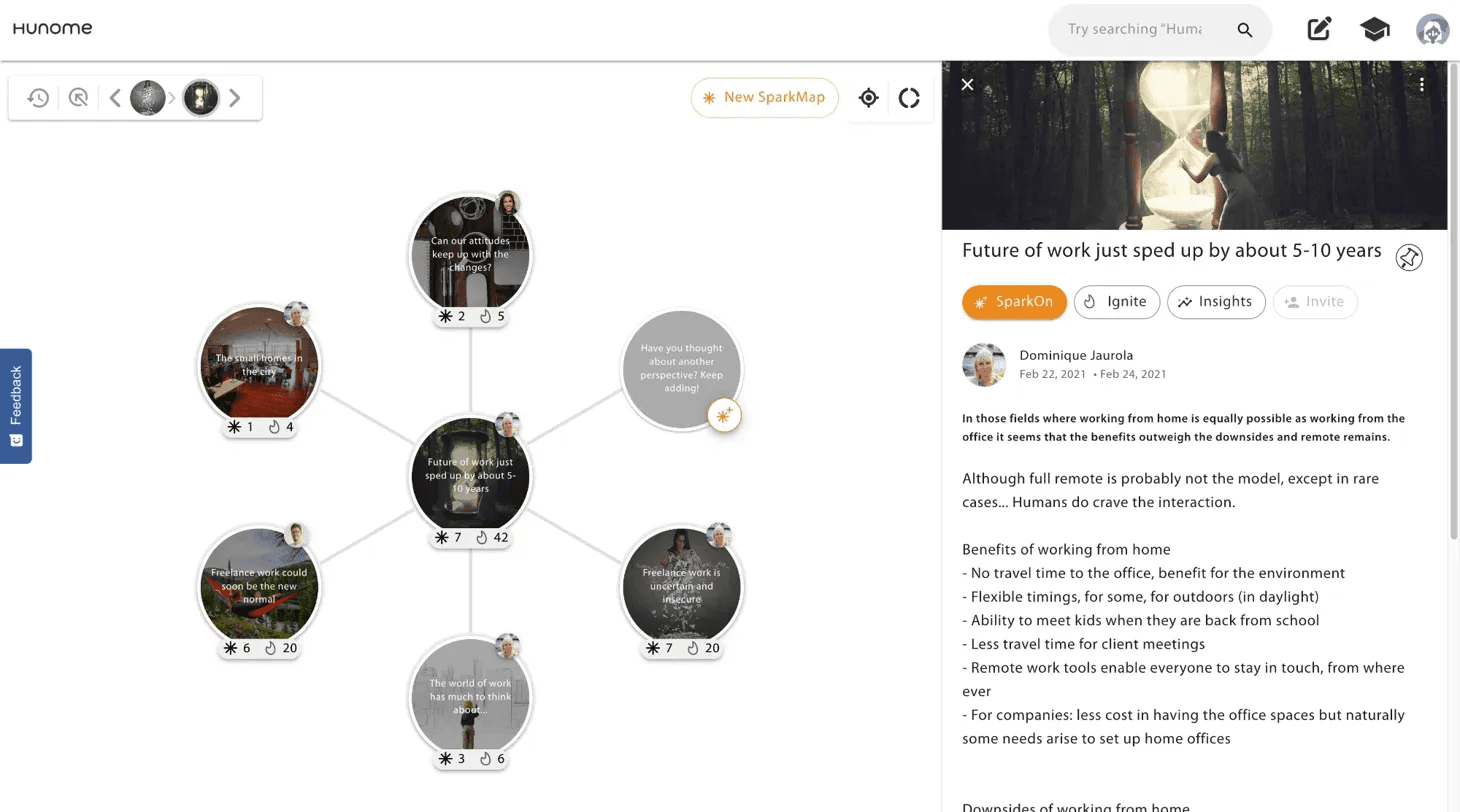
Creating and viewing SparkMaps is Hunome's core feature, but users didn't understand how to interact with node-based knowledge networks.
My Solution
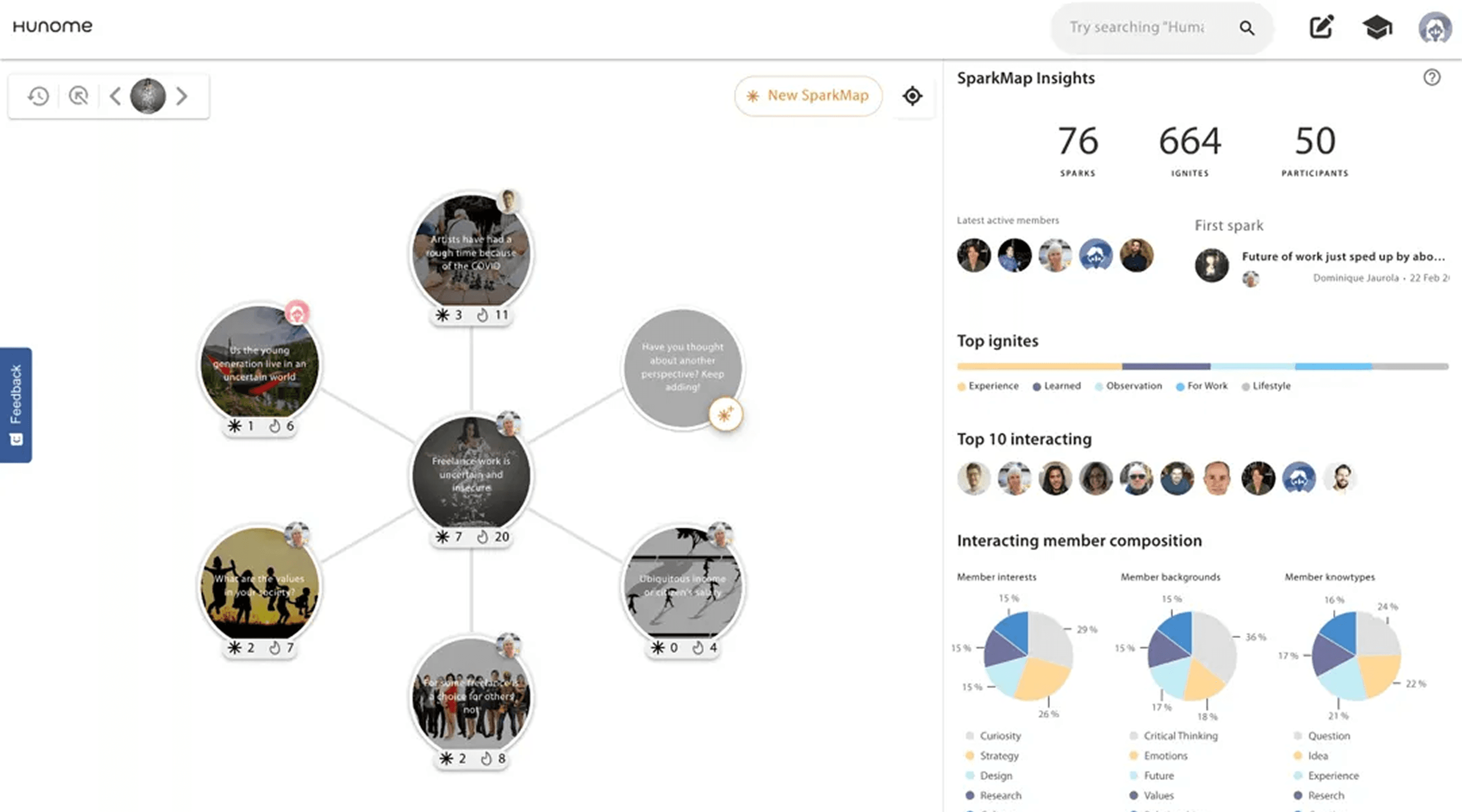
SparkMap Visualization
Node design clearly shows: image, title, creator, engagement
Connection lines show relationships between perspectives
Hover and selection states indicate interactivity
Prominent "New SparkMap" button with intuitive creation flow
Spark Creation
Right-panel creation flow with clear steps
Image upload guidance (size limits, formats)
Draft state explanation so users understand the process
Progressive disclosure (basic info first, then Ignite selection)
Impact
Users can now create knowledge maps and understand connections between perspectives through clear visual design and guided workflows.
The Problem
Creating and viewing SparkMaps is Hunome's core feature, but users didn't understand how to interact with node-based knowledge networks.
My Solution
SparkMap Visualization
Node design clearly shows: image, title, creator, engagement
Connection lines show relationships between perspectives
Hover and selection states indicate interactivity
Prominent "New SparkMap" button with intuitive creation flow
Spark Creation
Right-panel creation flow with clear steps
Image upload guidance (size limits, formats)
Draft state explanation so users understand the process
Progressive disclosure (basic info first, then Ignite selection)
Impact
Users can now create knowledge maps and understand connections between perspectives through clear visual design and guided workflows.
Search & Filtering System
Search & Filtering System
The Problem
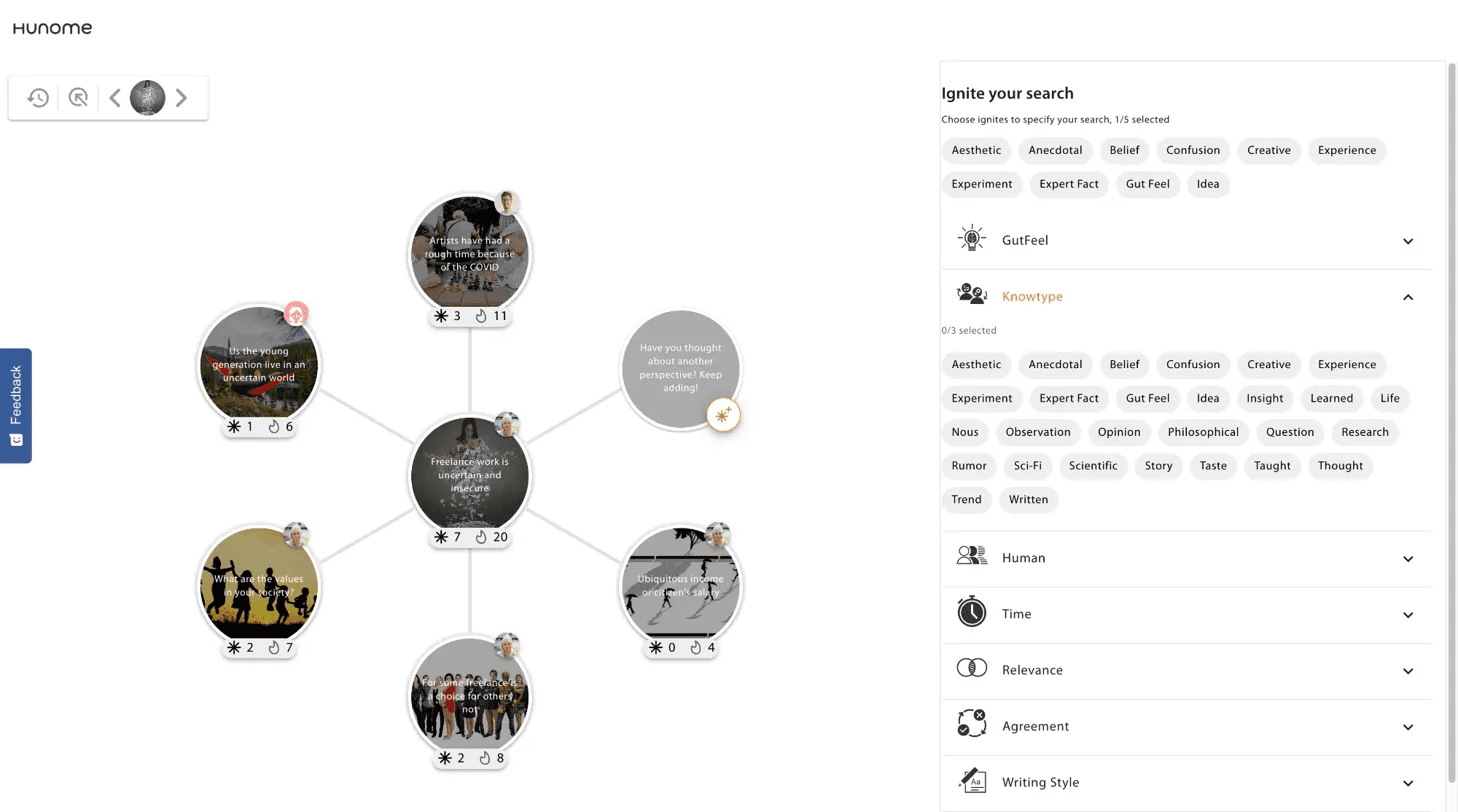
Hunome's search filters by "Ignites" (perspective types like GutFeel, Creative, Observation)—a concept users have never encountered before.
My Solution
Ignite-Based Search
Clear filter categories: Aesthetic, Anecdotal, Belief, Confusion, Creative, etc.
Expandable sections for Human, Time, Relevance, Agreement, Writing Style
"Ignite your search" guidance explains the filtering concept
Active filter states show what's currently applied
Search results maintain SparkMap visualization for consistency
Impact
Users can discover perspectives based on thinking type (not just keywords), making knowledge discovery more nuanced once they understand the system.
The Problem
Hunome's search filters by "Ignites" (perspective types like GutFeel, Creative, Observation)—a concept users have never encountered before.
My Solution
Ignite-Based Search
Clear filter categories: Aesthetic, Anecdotal, Belief, Confusion, Creative, etc.
Expandable sections for Human, Time, Relevance, Agreement, Writing Style
"Ignite your search" guidance explains the filtering concept
Active filter states show what's currently applied
Search results maintain SparkMap visualization for consistency
Impact
Users can discover perspectives based on thinking type (not just keywords), making knowledge discovery more nuanced once they understand the system.
Data Visualization & Insights
Data Visualization & Insights
The Problem
Analytics dashboards needed to show collective insights from SparkMaps, but the data was complex and unfamiliar.
My Solution
Worked closely with the data team to design visualizations that made insights understandable:
SparkMap Insights Dashboard
Top metrics: Total Sparks, Ignites, Participants
Top Ignites chart showing most-used perspective types
Member composition breakdown (interests, backgrounds, knowtypes)
"Varying perspectives" section highlighting diverse viewpoints
Clean visual hierarchy prioritizing most important data
Design Decisions
Used pie charts for composition data (easy to scan)
Color-coded Ignite types for quick recognition
Clear labels explaining what each metric means
Grouped related data to tell a story about collective thinking
Status
These designs were completed but not yet implemented when my contract ended.
Impact
Created framework for making collective sensemaking data actionable and understandable for users.
The Problem
Analytics dashboards needed to show collective insights from SparkMaps, but the data was complex and unfamiliar.
My Solution
Worked closely with the data team to design visualizations that made insights understandable:
SparkMap Insights Dashboard
Top metrics: Total Sparks, Ignites, Participants
Top Ignites chart showing most-used perspective types
Member composition breakdown (interests, backgrounds, knowtypes)
"Varying perspectives" section highlighting diverse viewpoints
Clean visual hierarchy prioritizing most important data
Design Decisions
Used pie charts for composition data (easy to scan)
Color-coded Ignite types for quick recognition
Clear labels explaining what each metric means
Grouped related data to tell a story about collective thinking
Status
These designs were completed but not yet implemented when my contract ended.
Impact
Created framework for making collective sensemaking data actionable and understandable for users.
Results
Results
Complete UI System Implemented
Redesigned entire interface: SparkMaps, search, profiles, creation flows
All designs implemented and live in production
Designs remain active months after contract ended
Made Unfamiliar Interactions Clear
Visual hierarchy guides users through complex workflows
Clear navigation, copy, and tooltips reduce confusion
Consistent patterns make novel interactions learnable
Foundation for Data Visualization
Designed analytics framework for collective insights
Collaborated with data team on visualization approach
Created scalable component patterns
Complete UI System Implemented
Redesigned entire interface: SparkMaps, search, profiles, creation flows
All designs implemented and live in production
Designs remain active months after contract ended
Made Unfamiliar Interactions Clear
Visual hierarchy guides users through complex workflows
Clear navigation, copy, and tooltips reduce confusion
Consistent patterns make novel interactions learnable
Foundation for Data Visualization
Designed analytics framework for collective insights
Collaborated with data team on visualization approach
Created scalable component patterns
What I Learned
What I Learned
1. Unfamiliar interfaces need extra clarity
When users have no reference point, every element must communicate its purpose. Navigation, icons, copy, and tooltips aren't nice-to-haves—they're essential.
2. Visual complexity requires interaction simplicity
Node-based visualization is inherently complex. Hover states, selection feedback, and connection lines needed to be crystal clear for users to understand relationships.
3. Collaborating with data teams requires design thinking
Working with the data team on visualizations taught me to ask "what story does this data tell?" not just "how do we display this data?"
4. Consistency is critical for novel patterns
When inventing new interaction patterns, consistency across the platform helps users build mental models. SparkMap visualization worked the same everywhere.
1. Unfamiliar interfaces need extra clarity
When users have no reference point, every element must communicate its purpose. Navigation, icons, copy, and tooltips aren't nice-to-haves—they're essential.
2. Visual complexity requires interaction simplicity
Node-based visualization is inherently complex. Hover states, selection feedback, and connection lines needed to be crystal clear for users to understand relationships.
3. Collaborating with data teams requires design thinking
Working with the data team on visualizations taught me to ask "what story does this data tell?" not just "how do we display this data?"
4. Consistency is critical for novel patterns
When inventing new interaction patterns, consistency across the platform helps users build mental models. SparkMap visualization worked the same everywhere.
Product Design, UI Design, Information Architecture, Data Visualization, Knowledge Management, Complex Systems
Product Design, UI Design, Information Architecture, Data Visualization, Knowledge Management, Complex Systems
Based in Abuja Nigeria, working remote worldwide
Local time Gmt +1
PRODUCT DESIGN *
USER RESEARCH *
DESIGN SYSTEMS *
CULTURAL DESIGN *
AI WORKFLOWS *
All rights reserved
Designed and developed by Helen Ihediwa © 2025
Based in Abuja Nigeria, working remote worldwide
Local time Gmt +1
PRODUCT DESIGN *
USER RESEARCH *
DESIGN SYSTEMS *
CULTURAL DESIGN *
AI WORKFLOWS *
All rights reserved
Designed and developed by Helen Ihediwa © 2025
Based in Abuja Nigeria, working remote worldwide
Local time Gmt +1
PRODUCT DESIGN *
USER RESEARCH *
DESIGN SYSTEMS *
CULTURAL DESIGN *
AI WORKFLOWS *
All rights reserved
Designed and developed by Helen Ihediwa © 2025